
Set the screen resolution of FEDORA 10 in VMWARE
Change by doing the following at FEDORA 10
system| preferences| hardware| screen resolution
and choose your desire resolution, then click "apply" and "ok".


Change by doing the following at FEDORA 10
system| preferences| hardware| screen resolution
and choose your desire resolution, then click "apply" and "ok".
Download: ns-allinone-2.33
I have used VMWARE with Fedora 10 to install NS-2 for my convenience. The steps are as below:
Pre-installation NS-2:
1. Make sure FEDORA 10 is updated completely at the autoupdate.
2. Have the following install at TERMINAL. You must be the "root" to do this:
yum install autoconf
yum install automake
yum install gcc-c++
yum install libX11-devel
yum install xorg-x11-proto-devel
yum install libXt-devel
yum install libXmu-devel
yum install tk
yum install tcl
yum install make
yum install perl
yum install gnuplot
Installation for NS-2 in FEDORA 10:
1. Unzipped NS-2.33 file:
tar -xvzf ns-allinone-2.33.tar.gz
2. Go into ns-2.33 directory:
cd ns-allinone-2.33
3. Install ns-2.33
./install
4. Set environment:
gedit ~/.bashrc
Replace the following to your .bashrc file, double check your own installation path and version. Set the environment at "cd /home/username" as a user and not the "root":
# .bashrc5. If your environment is set properly, you should be able to run the command "ns" and get the result "%".
# Source global definitions
if [ -f /etc/bashrc ]; then
. /etc/bashrc
fi
# User specific aliases and functions
# LD_LIBRARY_PATH
OTCL_LIB=/home/ellysoo/ns-allinone-2.33/otcl-1.13
NS2_LIB=/home/ellysoo/ns-allinone-2.33/lib
X11_LIB=/ellysoo/X11R6/lib
USR_LOCAL_LIB=/home/ellysoo/lib
export LD_LIBRARY_PATH=$LD_LIBRARY_PATH:$OTCL_LIB:$NS2_LIB:$X11_LIB:$USR_LOCAL_LIB
# TCL_LIBRARY
TCL_LIB=/home/ellysoo/ns-allinone-2.33/tcl8.4.18/library
USR_LIB=/ellysoo/lib
export TCL_LIBRARY=$TCL_LIB:$USR_LIB
# PATH
XGRAPH=/home/ellysoo/ns-allinone-2.33/bin:/home/ellysoo/ns-allinone-2.33/tcl8.4.18/unix:/home/ellysoo/ns-allinone-2.33/tk8.4.18/unix
NS=/home/ellysoo/ns-allinone-2.33/ns-2.33/
NAM=/home/ellysoo/ns-allinone-2.33/nam-1.13/
PATH=$PATH:$XGRAPH:$NS:$NAM
1. Yum install java-1.6.0-openjdk-plugin
2. At the directory of NSG2, type the command: java -jar NSG2.1.jar
Open your vmware vmx file with notepad and replace all as below and make sure the filename is same as your filename inside the same folder:
Download: VMX File
#!/usr/bin/vmware
.encoding = "UTF-8"
config.version = "8"
virtualHW.version = "4"
scsi0.present = "TRUE"
scsi0.virtualDev = "lsilogic"
memsize = "256"
scsi0:0.present = "TRUE"
scsi0:0.fileName = "fedora-10-i386.vmdk"
ide1:0.present = "TRUE"
ide1:0.fileName = "auto detect"
ide1:0.deviceType = "cdrom-raw"
floppy0.startConnected = "FALSE"
floppy0.fileName = "/dev/fd0"
ethernet0.present = "TRUE"
ethernet0.connectionType = "nat"
ethernet0.wakeOnPcktRcv = "FALSE"
roamingVM.exitBehavior = "go"
displayName = "Fedora10"
guestOS = "other26xlinux"
nvram = "fedora-10-i386.nvram"
virtualHW.productCompatibility = "esx"
ft.secondary0.enabled = "TRUE"
tools.upgrade.policy = "useGlobal"
# PowerOn/Off options
gui.powerOnAtStartup = "FALSE"
gui.fullScreenAtPowerOn = "TRUE"
gui.exitAtPowerOff = "TRUE"
# USB settings
# This config activates USB
usb.present = "TRUE"
usb.generic.autoconnect = "TRUE"
# Optional second serial port, physical COM2 is not available
serial1.present = "FALSE"
# First parallell port, physical LPT1 is available
parallel0.present = "TRUE"
parallel0.fileName = "Auto Detect"
parallel0.autodetect = "TRUE"
parallel0.bidirectional = "TRUE"
# Sound settings
sound.present = "TRUE"
sound.fileName = "-1"
sound.autodetect = "TRUE"
# Other default settings
#svga.autodetect = "TRUE"
svga.maxWidth=1280
svga.maxHeight=1024
mks.keyboardFilter = "allow"
snapshot.action = "autoCommit"
extendedConfigFile = "fedora-10-i386.vmxf"
ethernet0.addressType = "generated"
uuid.location = "56 4d b4 d1 71 51 96 7f-92 5a e6 00 a7 63 44 b1"
uuid.bios = "56 4d b4 d1 71 51 96 7f-92 5a e6 00 a7 63 44 b1"
scsi0:0.redo = ""
vmotion.checkpointFBSize = "16777216"
ethernet0.generatedAddress = "00:0c:29:63:44:b1"
ethernet0.generatedAddressOffset = "0"
tools.remindInstall = "FALSE"
ide1:0.autodetect = "TRUE"
floppy0.autodetect = "TRUE"
checkpoint.vmState = "fedora-10-i386.vmss"
tools.syncTime = "FALSE"
isolation.tools.hgfs.disable = "FALSE"
usb.autoConnect.device0 = ""
parallel0.startConnected = "FALSE"
As referred to: http://ns-2.blogspot.com
I have followed the steps below for Tracegraph installation:
Download Tracegraph for linux: Tracegraph202
Download Matlab for tracegraph: Matlab
Download my .bashrc file: .bashrc
Installation instructions on Linux:
1)Download tracegraph and mglinstaller from the webpage
Check Trace graph download page: http://www.tracegraph.com/download.html
Choose Linux version and download mglinstaller.
2) At the directory where you save the tracegraph and mglinstaller.
Command: tar -xvzf tracegraph202.linux.tar.gz
3) Command: gunzip mglinstaller.gz
4) Command: sh mglinstaller
5) When asking for location folder, set /home/user1/mgl as the location
6) set the environment path variable by
Command: gedit ~/.bashrc
In .bashrc file, add in the following:
export LD_LIBRARY_PATH=$LD_LIBRARY_PATH:/home/user1/mgl/bin/glnx86
7) Check the environment,
Command: printenv LD_LIBRARY_PATH
8) Go to directory /home/user1/Tracegraph202 and run trgraph.
Command: ./trgraph
Errors encounter when installing:
1) ./trgraph: error while loading shared libraries: libmwcl.so: cannot open shared object file: No such file or directory
Solution: LD_LIBRARY_PATH is not defined properly. Check with printenv and set the environment again.
2) ./trgraph: error while loading shared libraries: libXp.so.6: cannot open shared object file: No such file or directory
solution: yum install libXp.so.6
Installation instructions on Windows:
1)Download tracegraph and mglinstaller from the page make sure it is windows version http://www.tracegraph.com/download.html
2)unzip tracegraph202.zip to say, D:\
3)execute mglinstaller.exe, when it asks for directory name, enter D:\tracegraph202
4) add D:\tracegraph202\bin\win32 to your environment PATH
5)how to add to environment PATH??
right click on Mycomputer and select properties
From properties select Advanced tab
Select environment path variables
Select PATH and add your path to it
Thats it tracegraph is now ready!!
This is the procedure i followed while installing tracegraph on both windows and linux (if you dont have matlab installed on your machine.)
Download: Patch
Error when executing nam in Fedora 10 terminal:
nam:
[code omitted because of length]
: no event type or button # or keysym
while executing
"bind Listbox
%W yview scroll [expr {- (%D / 120) * 4}] units
}"
invoked from within
"if {[tk windowingsystem] eq "classic" || [tk windowingsystem] eq "aqua"} {
bind Listbox
%W yview scroll [expr {- (%D)}] units
}
bind Li..."
After installing Fedora 10 with NS-2 two months back, the solution seems to have been faded from my mind. Totally cannot recall. Now my friend is having this error, yet I have forgotten how to solve it. Should have record all the solution here for reference last time but I have started this blog kinda late. Hope will soon find the solution and definitely will update in here this time!
Solution:
PS: For my case, I have to be the "root" so that ./install will compile my ns-2 completely.
OR
Download: NSG2.1
1. Creating wired and wireless nodes
2. Creating connection between nodes
3. Creating links (Duplex-Link and Simplex-Link)
4. Creating agents (TCP and UDP)
5. Creating applications (CBR and FTP)
6. Node movement
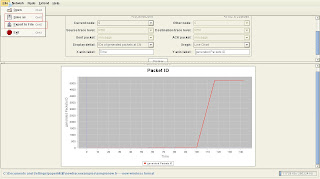
The link of the site is: http://sites.google.com/site/pengjungwu/nsg Read More......
Download: Java
Download: jTrana
Download: Mysql5.1.30-32bits
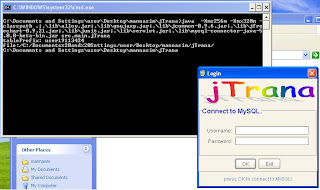
JTrana is a java-based NS2 Wireless Trace Analyzer. You can use it to analyse the NS2 wireless simulation traces.
What can jTrana do?
Network related: Overall information, Energy remained for the whole network, Packet statistics.
Nodes Related: Current selected node info, packets id, throughput, energy, sequence number, delay, RTT, Movement
Custom function: Get the data from the MySQL database using SQL-like script and get the results.
Special thanks to Nancy for supplying me the installers which have saved my time a lot from downloading with the campus snail speed internet access.
Software needed:
 Read More......
Download Protoname source code: PROTONAME
Just went through ip-tech.blogspot and happened to read on his post about creating own protocols. This information is really helpful to me, hopefully by reading the guideline in "Implementing a New Unicast routing Protocol in NS2", I would able to write my own routing protocols soon.
Download "Implementing a New Unicast routing Protocol in NS2" here:
http://masimum.dif.um.es/nsrt-howto/pdf/nsrt-howto.pdf
Download: NS-2.33
After done some literature review, since like NS-2 would be the best network simulation tool in my research. As most people have used it all this time. Therefore, I have tried to install the latest NS-2.33 in cygwin because my operating system is in Windows XP (in Virtual PC).
Here are the steps to install NS-2 in virtual pc with cygwin:
Download virtual PC here:
http://www.microsoft.com/downloads/details.aspx?FamilyID=04d26402-3199-48a3-afa2-2dc0b40a73b6&displaylang=en
Download Window XP OS for virtual PC here:
http://www.microsoft.com/downloads/details.aspx?FamilyID=21eabb90-958f-4b64-b5f1-73d0a413c8ef&DisplayLang=en
Download Cygwin here:
http://www.cygwin.com/
Download latest NS-2 here:
http://sourceforge.net/projects/nsnam/
With all these downloaded, you are all set to go to install NS-2 in your virtual pc.
If the link is broken, you may just search for the file with google search.
I should have blog this earlier about every obstacles and steps that have been taken upon my NS-2 experience. I hope now is still not too late yet. I hope to give this blog updated with every problems that I have faced when installing NS-2, running NS-2 and progressing with my research throughout my postgraduate studies.
Besides having this blog as a note to myself, hopefully the contents of the blog can serve as an aid to others who faced the similar problem as me. I have found blog is the most informative way for me to learn the way to start NS-2 and has helped me to solve some of my problem. Therefore, I have decided to write in my blog too to share with people and gained valuable advice from my reader.
Happy reading! That all for a short opening post. ^ ^
